








How To Create An eBook That People Actually Read And Buy
Mastering how to create an eBook is no longer something only marketers care about for lead magnets. Now, eBooks are important business tools that help organizations share knowledge, teach their audiences, and support growth over time. Many people, like companies, consultants, HR leaders, educators, and entrepreneurs, use eBooks to show expertise, explain complex ideas, find new leads, build digital products, and improve learning programs. No matter if you are making training materials, industry guides, or special resources, a well-made eBook can offer real value.
Learning how to create an eBook starts with more than choosing an eBook maker or downloading eBook templates. To succeed, you need to plan your content, know your audience, and choose the right tools for writing, designing, publishing, and sharing your eBook. Tools like Canva templates, free eBook creators, and AI solutions can make things faster, but they work best when you have a clear plan and strong content.
This guide will show you how to create an eBook, pick the best tools, design a professional publication, and publish it in the right format. If you want to sell your eBook, you’ll also learn how to promote it. Whether you’re making your first eBook or improving your content strategy, this guide will help you create something your readers will value.
What Is An eBook?
Understanding how to create an eBook starts with knowing what an eBook actually is. An eBook is a digital publication you can read on computers, tablets, smartphones, or eReaders. Today, eBooks are used as educational tools, lead magnets, training manuals, reports, and even products for sale, and they usually come in formats such as PDF or EPUB.
- PDF keeps the layout the same and is good for reports, guides, and workbooks.
- EPUB adjusts text to fit any screen size.
- MOBI is an older format once used for Amazon Kindle. Today, most professionals choose EPUB or PDF.
Some eBooks have interactive features like clickable tables of contents, videos, quizzes, links, and downloadable resources. These features make learning more engaging, especially for training or educational materials.
The most successful eBooks in our company aren’t the longest, but the ones that solve a specific problem. When we combine subject matter expertise with thoughtful design and a clear purpose, an eBook becomes a strategic business asset, not just another downloadable document.
-Christopher Pappas, CEO and founder of eLearning Industry
Why Create An eBook?
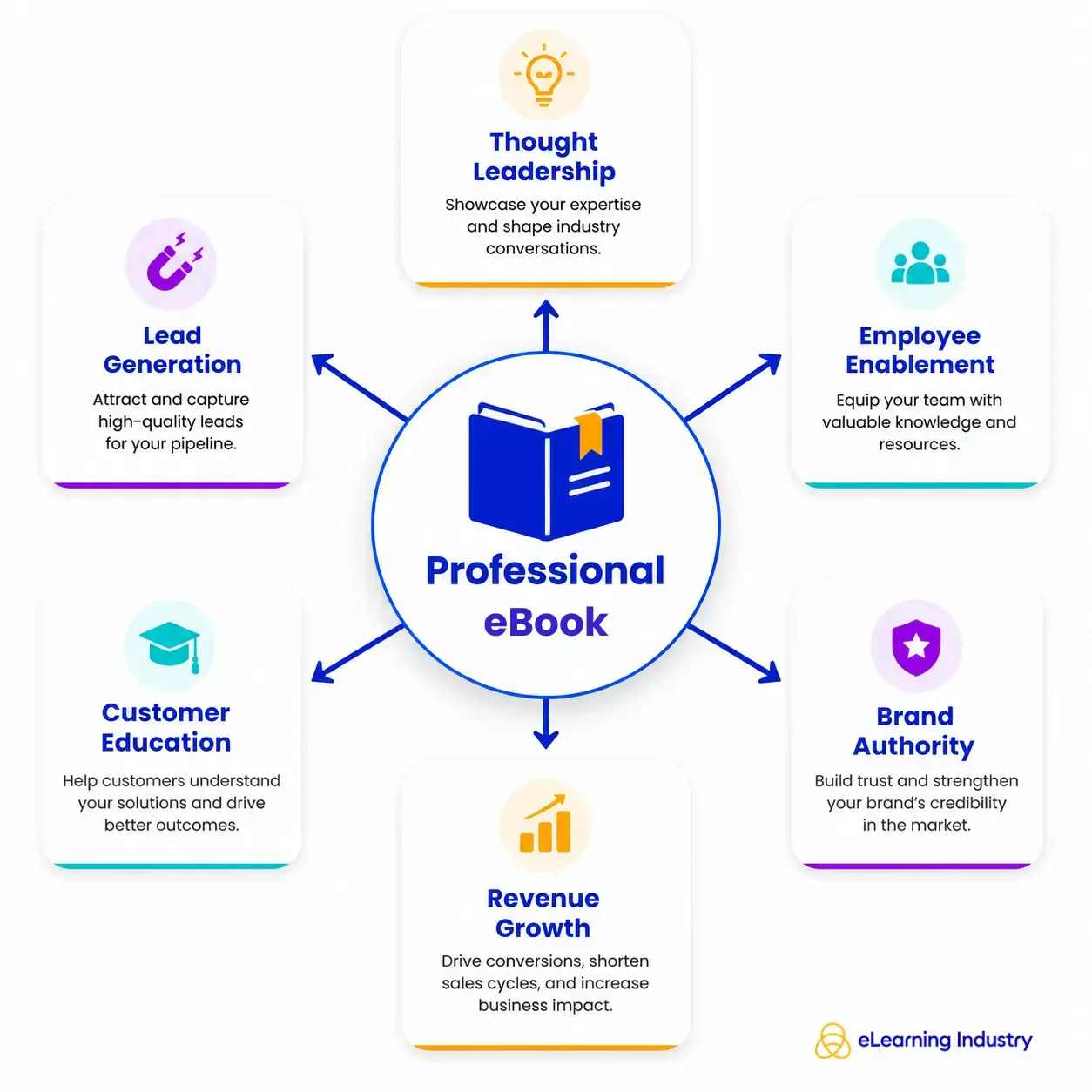
Learning how to create an eBook goes beyond just publishing digital content. It means building a resource that offers real value to your audience and helps you reach your business goals. If you are an L&D leader, HR professional, consultant, or business owner, a well-made eBook can teach your readers, build your credibility, and serve as a lasting asset that continues to deliver results over time.
Thought Leadership
An eBook lets you dive deeper into a topic than a blog post or social media update. By sharing your own insights, useful frameworks, research, or real experiences, you can show that you or your organization is a trusted expert. For those in Learning and Development, this could mean writing an eBook about leadership, employee skills, or new trends in workplace learning. Well-made eBooks can also bring in backlinks, media coverage, and mentions from AI search tools, which can boost your online presence.
Employee And Customer Education
For L&D teams, eBooks are a great way to organize knowledge into a clear learning tool. They can help with onboarding, compliance, product training, or leadership programs. Unlike standard documents, an eBook uses simple explanations, visuals, and real examples to keep people interested and help them remember what they learn. Customers also gain from eBooks that explain your products, services, or industry, which can lower support requests and build trust.
Lead Generation
Many organizations use eBooks as special content to reach more people. By offering a helpful eBook in exchange for contact details, you can attract leads who are truly interested in what you know. After someone downloads your eBook, it can be the first step in building a relationship through emails, webinars, or more learning materials.
Digital Product Revenue
If you’re exploring how to create an eBook to sell, it’s a cost-effective way to turn your expertise into income. You can share your knowledge through downloadable guides, playbooks, or training materials, all without the expense of printing. Adding an eBook to your digital product lineup can help you earn steady revenue and reach more people through online marketplaces, your website, or learning platforms.

How To Create An eBook In 8 Steps
Learning how to create an eBook involves more than just picking a nice design or eBook maker. A great eBook addresses a real problem, offers useful insights, and supports a clear goal, like training staff, finding new leads, or earning extra income. Here are 8 steps to help you make an eBook that is useful, professional, and valuable over time.
Step 1: Define The Purpose And Audience
Before you begin, ask yourself two key questions: Why are you writing this eBook, and who will read it? Knowing your purpose keeps you on track, and understanding your audience makes your content more helpful and relevant.
Begin by imagining your ideal reader. Consider their job, experience, challenges, and goals. For instance, an HR manager might want practical onboarding tips, while an L&D leader could be looking for ways to measure training results.
Next, find out what problems your readers face and turn those into learning goals. Each chapter should help them solve a problem or reach a goal. Try to link these goals to your business needs, like building your reputation, teaching customers, or finding new leads.
Common eBook examples include:
- An employee onboarding guide
- A compliance handbook
- An industry report based on original research
- A leadership playbook for new managers
Having a clear purpose makes every step that follows, from writing to designing and promoting your eBook, much easier.
Step 2: Research And Organize Your Content
Good eBooks rely on trustworthy, well-organized information. Collect ideas from experts, company documents, customer feedback, and industry reports to make sure your content shows real knowledge.
Doing your own research, like surveys or using company data, can make your eBook more trusted and more likely to be cited by others. AI tools can help you brainstorm, sum up tough topics, or spot missing content. Still, always check and confirm any AI-generated ideas before you publish.
Also, always fact-check your work. Using accurate and current information builds your credibility and supports Google’s E-E-A-T principles: Experience, Expertise, Authoritativeness, and Trustworthiness. Before you start writing, organize your research into clear sections to make reading easier.
Step 3: Write The eBook
When learning how to write an eBook, focus on making your ideas clear and easy to understand. Aim to help readers learn quickly, rather than using complicated words to impress them.
Organize your chapters so readers smoothly transition from one topic to the next. Start with the basics, then move on to more advanced tips. Use short paragraphs, clear headings, bullet points, and examples to make your eBook easier to read.
Storytelling is also important. Real examples, case studies, and practical situations help readers understand and remember your points. Whenever you can, back up your advice with data, research, or expert quotes to build trust.
Use visuals like charts, diagrams, screenshots, and infographics to simplify complex ideas and make your content more engaging.
Some writing tips include:
- Focus on one idea per section.
- Use active voice whenever possible.
- Eliminate unnecessary jargon.
- End each chapter with a practical takeaway.
Step 4: Choose The Right eBook Creation Tool
The best tool for you depends on your goals, budget, and design skills. Some people just need a writing platform, while others want advanced design or teamwork features. Whether you want a free eBook creator or a full publishing tool, take time to compare your choices.
Tool |
Best For |
Pros |
Limitations |
| Canva | Beginners | Ready-made templates | Limited long-form editing |
| Microsoft Word | Writing | Familiar interface | Basic design capabilities |
| Adobe InDesign | Professional Publishing | Advanced Layouts | Steep learning curve |
| Google Docs | Collaboration | Easy sharing and commenting | Limited visual design |
| AI eBook Generators | Draft creation | Fast content generation | Requires human editing and fact-checking |
Many creators also use an eBook app, an online book maker, or other eBook maker platforms to simplify the production process.
Step 5: Design Your eBook
A well-designed eBook is easier to read and makes a bigger impact. Good design uses easy-to-read fonts, plenty of white space, and a clear layout that helps readers move through each page.
Make accessibility a priority. Use high-contrast colors, easy-to-read fonts, clear headings, and add alt text to images when needed. Keep your branding consistent with your logos, colors, and fonts to strengthen your organization’s identity.
Using ready-made eBook templates can save you time and still give your eBook a polished look. If you need a unique layout, it might be worth hiring an experienced eBook designer.
Step 6: Edit And Proofread
Every first draft needs a careful edit. Check your content for grammar, clarity, consistency, and accuracy. Try reading your document out loud to catch awkward sentences or repeated words.
If you can, ask colleagues or experts to review your work. They might notice unclear explanations or mistakes you missed. Also, check that your content is accessible so more people can use it.
Finally, make sure your formatting, terminology, headings, and visuals are consistent throughout your eBook.
Step 7: Export And Publish
Choose the file format that matches how you plan to share your eBook. PDFs are great for downloadable guides and lead magnets. EPUB works with most eReaders. For Amazon, use a Kindle-friendly format.
Most digital publishing tools let you export your eBook in different formats. This makes it easy to share your eBook on websites, learning platforms, and online bookstores.
Step 8: Promote Or Sell Your eBook
Publishing your eBook is just the first step. To reach more readers, set up a landing page that is easy to find on search engines, use email marketing to spread the word, and share interesting excerpts on LinkedIn. You can also offer your eBook on marketplaces or your company website.
If you want to make money from your eBook, you’ll also need to learn how to sell digital products online. Set up a professional website, use a secure payment system, and make sure customers can easily find what they need. If you plan to sell more eBooks in the future, think about building an online store where visitors can browse, buy, and download your digital products easily.
Can AI Help You Create An eBook?
Learning how to create an eBook has become faster thanks to AI, but it is most useful as a creative assistant, not a substitute for human skills. An eBook generator can help you come up with ideas, organize chapters, make outlines, draft sections, and simplify complex topics. This can save you a lot of time in the early stages, especially if you are starting from scratch.
Still, you should always review AI-generated content closely. Even the best AI eBook tools can create readable text, but they might miss original ideas, industry knowledge, or the detailed perspective that professionals look for. AI can also make mistakes, invent sources, or include false information, so careful fact-checking is a must. Good editing is just as important to keep your eBook’s tone, structure, and message consistent.
If you are making learning materials, business guides, or thought leadership pieces, AI should help you, not take over the writing. The best results come from using an eBook generator along with your own expertise, research, and editing skills.
Conclusion
Creating an eBook involves more than just writing. To make a successful eBook, you need valuable content, careful planning, good design, and a smart publishing strategy that fits your audience. Whether your goal is employee training, sharing your expertise, or selling your eBook, focusing on quality and relevance will help you get better results. Tools like eBook makers, AI assistants, and digital publishing software can make things easier, but they should support your skills, not replace them. When you combine technology with your own knowledge, your eBook can inform readers, build your credibility, and offer lasting value.


