






TL;DR:
- TalentLMS 7.1 is here, and it’s all about pace: keeping your training moving as fast as your organization grows.
- The headline feature: AI Video in TalentCraft, which turns a simple prompt into a ready-to-use training video, voiceover included.
- TalentLMS and TalentCards take their first step toward a more connected experience so you can support every type of learner in your workforce.
- Four everyday updates round it out: Assign Learning Paths to whole teams, preview courses without losing your place, manage Skills across branches, and let learners resume videos where they left off.
Every TalentLMS release is built so your training can keep up as your organization grows. The May 2026 release did exactly that: it gave learners a private space to practice, handed team leads their own view of progress, and linked TalentLMS directly to Workday.
TalentLMS 7.1 carries that momentum forward. It adds AI-generated training video inside TalentCraft, takes the first step toward a more connected experience between TalentLMS and TalentCards, and sharpens four everyday features your admins and learners already rely on.
| Update | What it improves |
|---|---|
| AI Video (TalentCraft) | Describe what you need and get a ready-to-use training video, with voiceover included, so you can create faster |
| TalentLMS × TalentCards | Make both platforms easier to access and navigate as part of one continuous learning journey |
| Learning Paths in Groups (V5) | Assign a whole learning path to a team once, and every new member gets it automatically |
| Course Overview in Drawer | Open a quick preview of any course to check what’s inside before you assign it, then close it and land right back where you were in your list |
| Skills in Branches (V2) | Manage Skills within your branch structure the same way you already manage Courses |
| Resuming video units | Your learners pick up videos right where they left off, so a paused video never means starting over |
Together, these updates make employee training software faster to create with, easier to manage, and smoother to use as your training program grows.
Introducing TalentLMS 7.1: A release about pace
As training programs grow, so does the pressure: more content to create, more learners to support, and everyday admin that keeps piling up. TalentLMS 7.1 meets you at each of those points.
Think of it as a set of well-placed upgrades. One helps you create content faster. One brings TalentLMS and TalentCards closer together. And the rest take the delays out of the tasks your admins and learners repeat every day.
💡 Want a live walkthrough? Join our 7.1 product release webinar. Register here.
AI Video: From prompt to lesson
Video can make training easier to follow, but creating it often comes with a production list of its own: write the script, find time to record, sit through the retakes, edit the footage, add a voiceover, and the list goes on and on.
With AI Video in TalentCraft, that list gets much shorter.
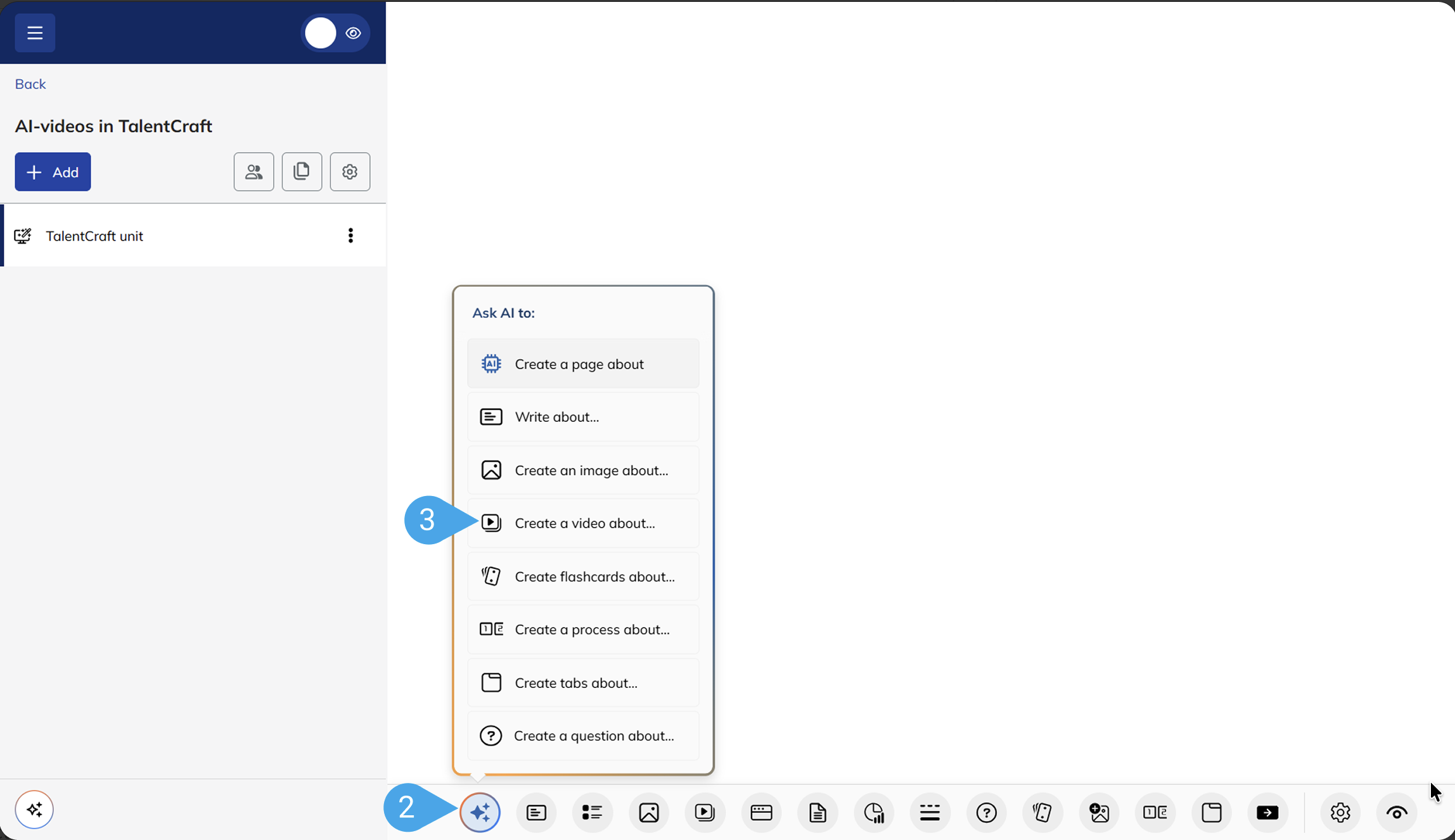
- Open the AI menu.
- Describe the video you need.
- Choose the clip length.
- Generate a ready-to-use video with voiceover included.
- Add it directly to your unit.
Your prompt could be as simple as:
- “Create a training video explaining how to identify a phishing email.”
- “Create a welcome video for a course that will introduce new employees to our customer service values.”
The voiceover follows the language of your prompt, so creating a clip in another language is as simple as writing the prompt that way.
AI Video is the latest upgrade in TalentCraft’s evolution from generating text, quizzes, and images to helping you bring more of your course content to life.
And because it all happens inside TalentLMS, you can move from idea to training content without adding another tool or production process to your workflow.
That means less time spent preparing the content and more time getting it in front of the people who need it.
TalentLMS × TalentCards: A connected experience for your people
Training does not always happen in the same place, on the same device, or in the same format. Some people sit at a desk. Others are on the move. Some need a full course. Others need a quick refresher in the flow of work.
That is where disconnected tools can start to create extra work. Your learners move between platforms, while your team manages users, access, and activity across separate systems.
Companies like Disagro had already found value in using TalentLMS and TalentCards side by side to train and support their whole workforce. Their need for the two platforms to work more closely together was one of the key reasons we began bringing them closer.
- TalentLMS remains the home for structured, in-depth training, from onboarding and compliance to upskilling.
- TalentCards adds a mobile-first way to reach people who learn away from a desk. It reinforces skills with microlearning versions of your training content and turns it into a daily habit rather than a one-time event.
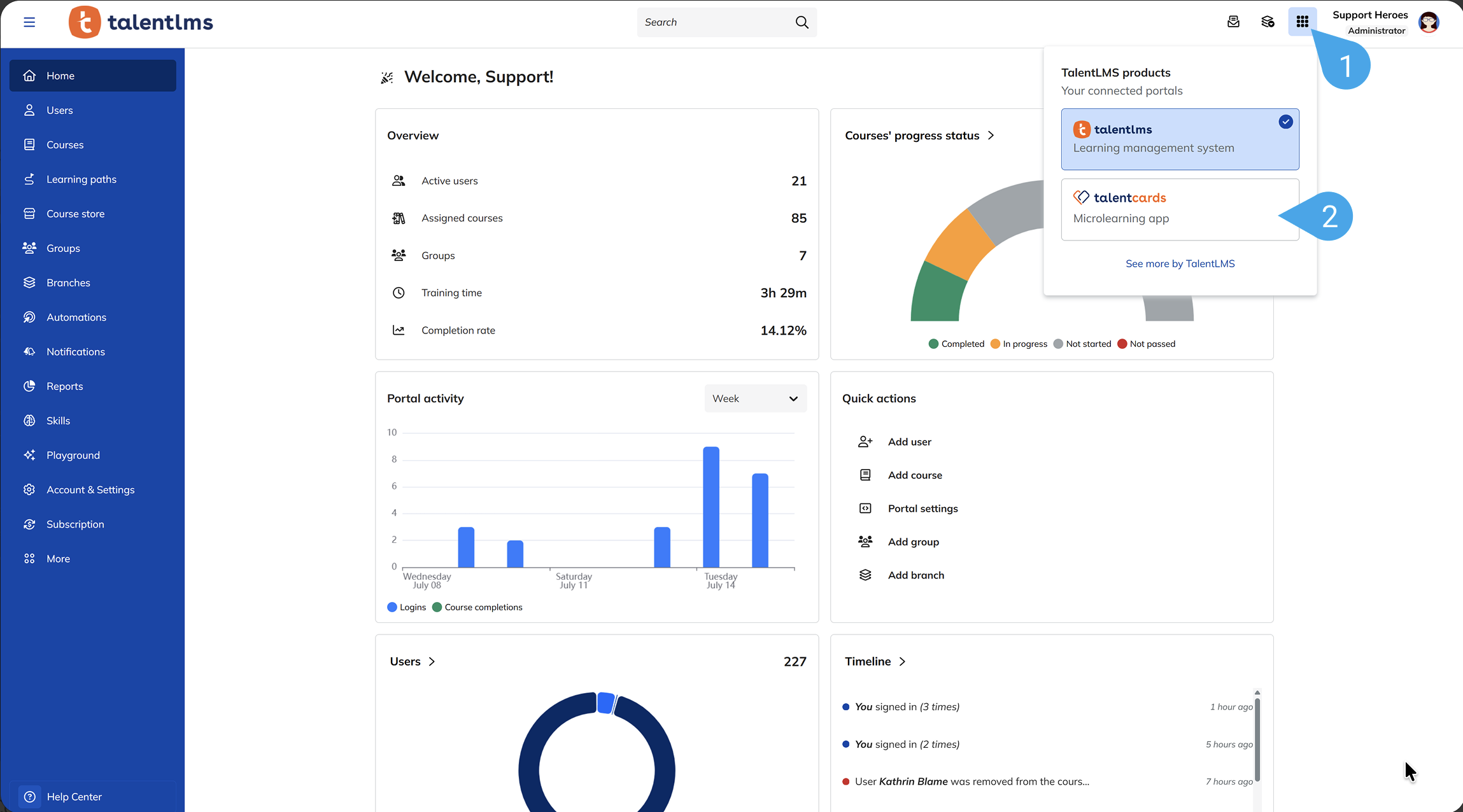
Set your users up once, not twice. Once connected, information syncs across both platforms, admins switch between TalentLMS and TalentCards in a click, and learners scan a QR code to open the app right from TalentLMS.
This is only the first step. The bigger goal is to create a more connected experience across the products your people use for hiring, onboarding, learning, and growth.
Because for your people, those stages are not separate. They are one continuous journey. And the tools behind them should feel that way too.

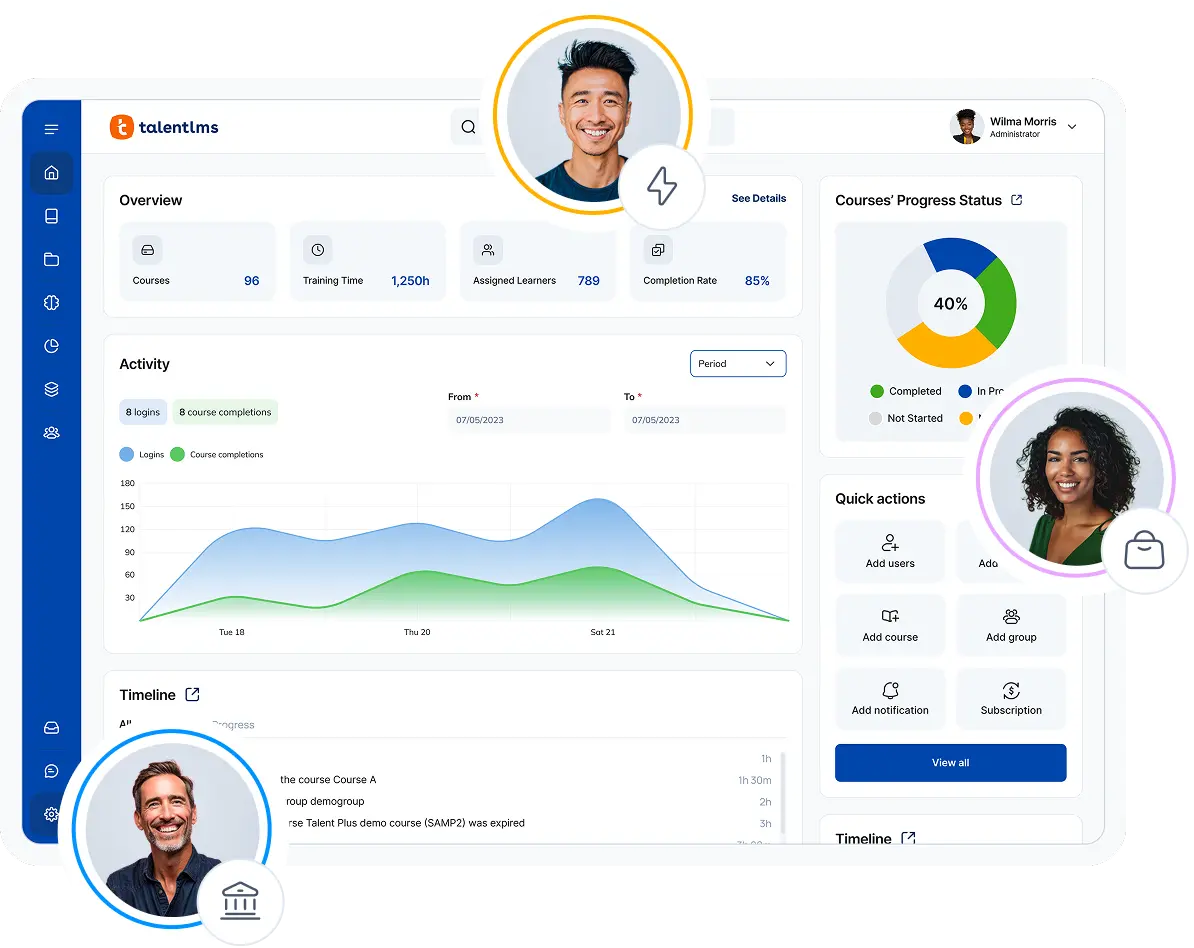
4 ways TalentLMS 7.1 removes everyday friction
The two updates above introduce new ways to create and deliver training.
But moving faster is also about removing the small, repetitive tasks that slow your team down as your learner base, course library, and organization grow.
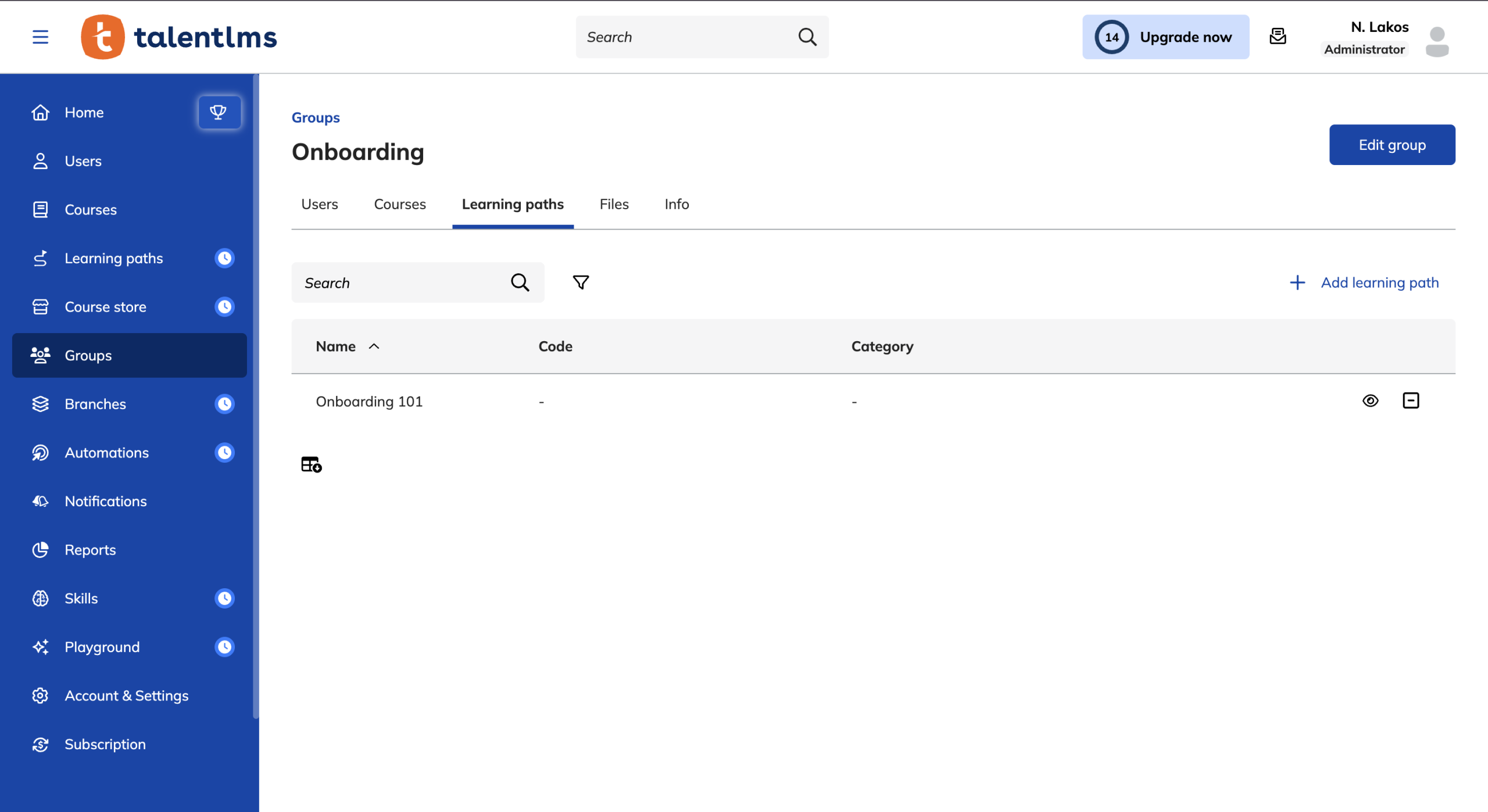
Learning Paths in Groups (V5): Assign once, train the whole team
Until now, assigning training worked one way for Courses and another for Learning Paths.
Courses had the team-level shortcut: assign once, and every new member inherited it automatically. Learning Paths didn’t. So every time someone new joined the team, adding them to the right path was one more manual step, and one more thing to remember.
In 7.1, Learning Paths get the same treatment. Assign a path to a team, a department, or a cohort, and every new member gets it automatically, with the same rules, permissions, and enrollment logic you already use for Courses in Groups.
🏆 Train 500 people as easily as 50, with no proportional increase in admin effort.
March and May made Learning Paths more flexible for learners and admins. In 7.1, we make them scale by team.
Course Overview in Drawer: Preview without losing your place
Moving faster is not always about cutting hours from a task. Sometimes, it is about avoiding the tiny interruptions that keep knocking you out of your rhythm.
You are scrolling through the catalog, spotting a few promising courses, and building a shortlist in your head. Then you open one for a closer look, and suddenly you are somewhere else. Your scroll position is gone. Your filters may be reset. Now you have to retrace your steps just to get back to where you were.
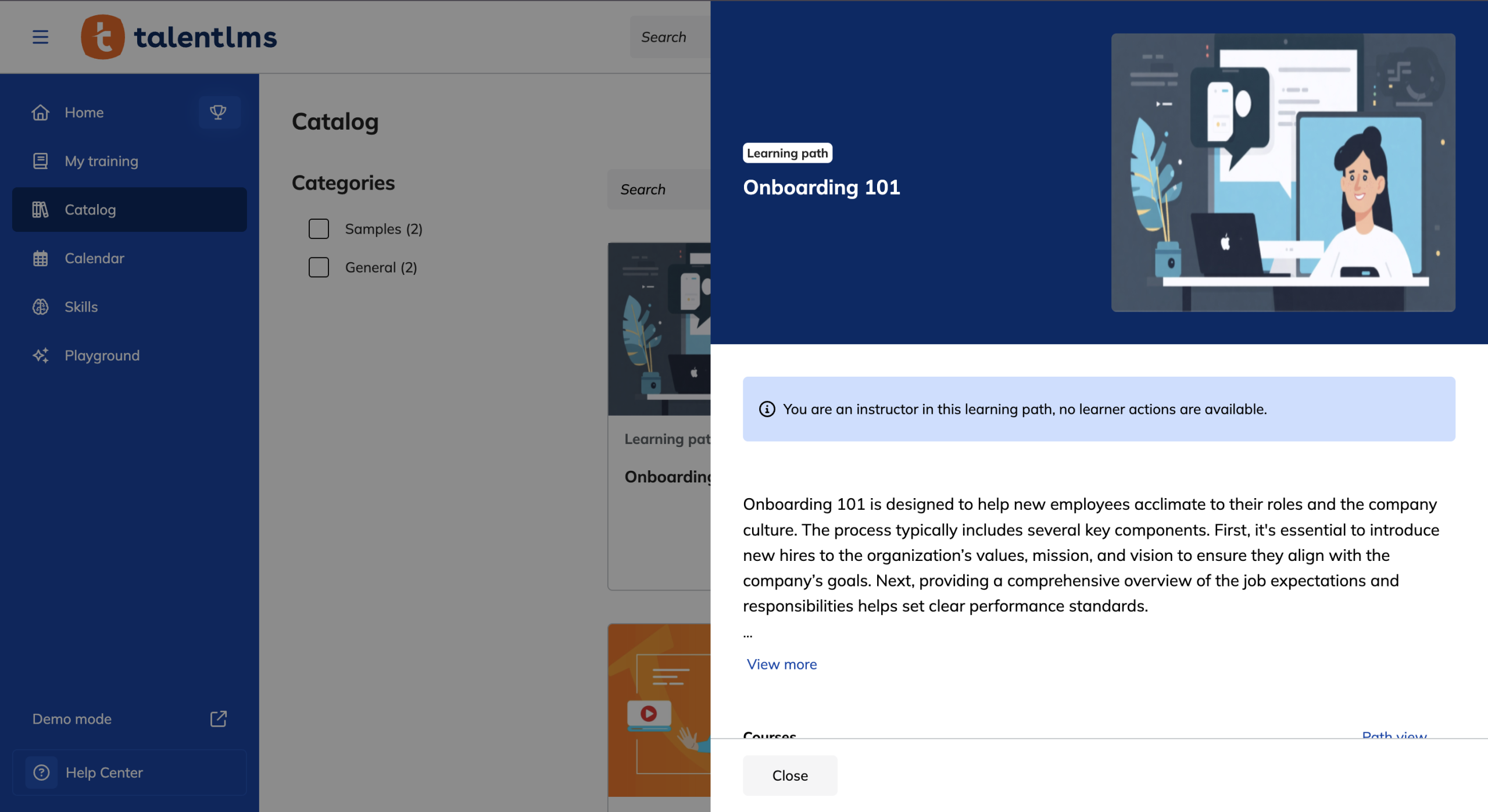
In TalentLMS 7.1, course cards open in a drawer on top of the catalog instead. You can check the overview, close the drawer, and carry on from the exact same spot.
Your scroll stays. Your filters stay. Your train of thought stays with you.
This is available across Admin, Instructor, Learner, and external catalog views.
🏆 Less friction in the small moments that can quietly slow down the whole day.
Skills in Branches (V2): Manage Skills with the same control as Courses
From the catalog to the org chart, the same “less drag” story scales up as your structure gets more complex. The more branches you run, the more it matters that everything behaves consistently.
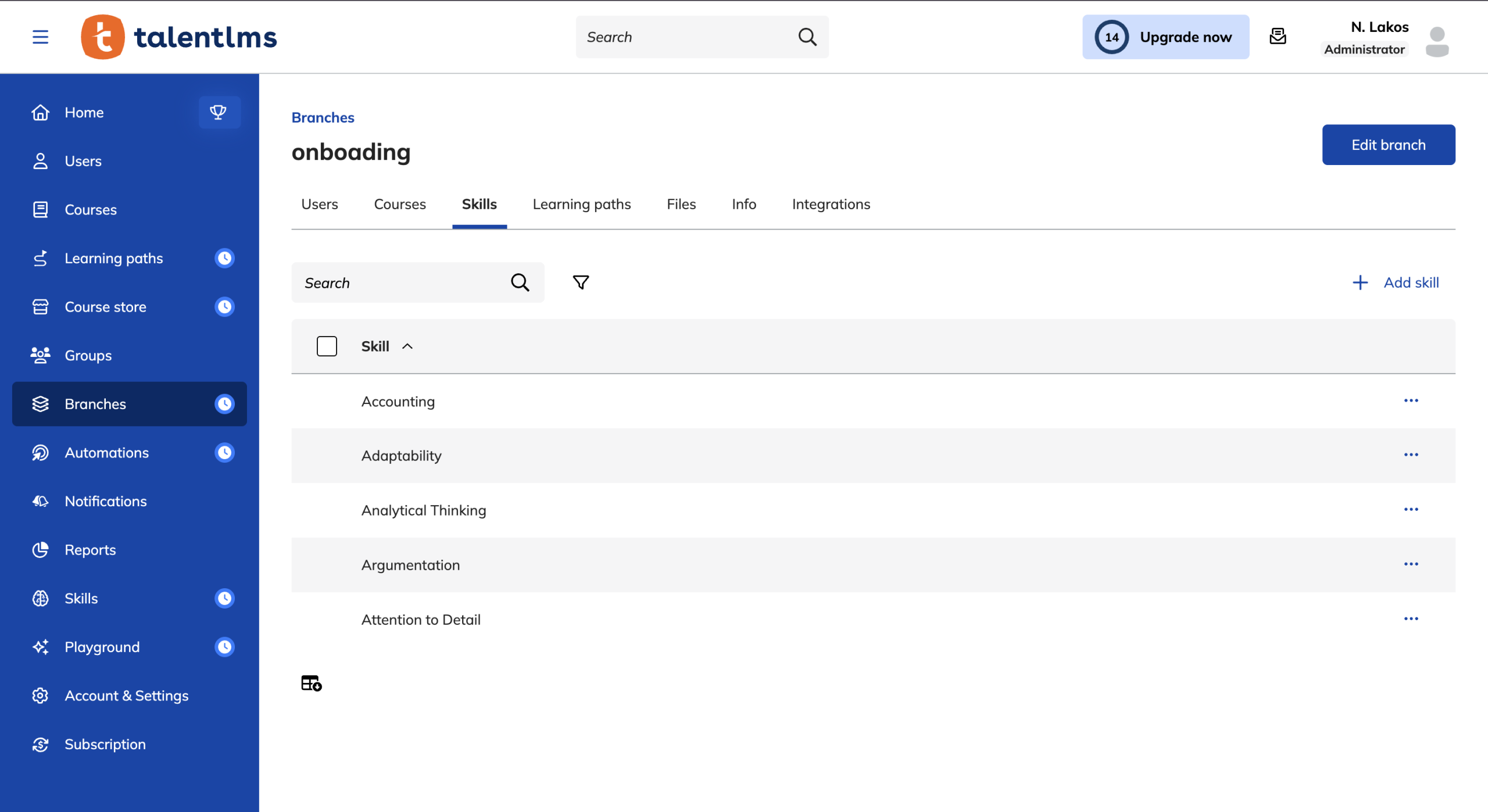
Skills already work across Branches. Multi-branch admins can set them up right where their users live.
What they couldn’t do, until now, was manage those skills the way they manage everything else, with the same permissions, visibility, and mass actions they already rely on for Courses.
In 7.1, that gap closes. Skills can belong to one or more branches.
Branch admins see and manage only their own branch’s skills. Mass actions do the work of ten. And reporting and visibility respect branch boundaries, the same way they already do for Courses.
🏆 Distributed oversight at the speed of the team, with no rebuilding skills for every branch.
In May, we brought Skills to Branches. In 7.1, we complete the picture.
Resuming video units: Pick up right where you left off
The first three wins all live on the admin side. This last one is for your learners, because pace only works if it reaches them too.
Picture the scene. A learner hits play on a training video, settles in, and then real life barges in.
A meeting invite flashes across the screen.
A Slack ping lights up.
Or the coffee’s calling, and they step away for two minutes.
They come back, press play, and the video drags them right back to second zero.
Now they’re watching the same intro for the third time, thumb hovering over the progress bar, hunting for the exact moment they got pulled away.
Multiple customers reached out to us asking for the same simple thing: “Let me pick up where I left off”…
And we listened.
In 7.1, videos resume from the exact second a learner paused, and their progress stays in sync with the timer.
It’s an optional setting you can switch on, and the kind of small fix your learners feel the very first time they hit play and land right where they left off.
🏆 Time-to-training smoothness at the unit level: learners don’t re-hunt, they resume.
One release, every part of your training program moves a little faster
TalentLMS 7.1 helps your training move at the pace your organization needs. Content comes together faster, more learners can access training in the way that works for them, and fewer roadblocks stand between setup and delivery.
Video, made faster
Video has always been the format that takes the longest to produce. Now it comes together right inside TalentCraft, alongside the text, quizzes, and images you already create there. The biggest blocker in your content workflow turns into one of the quickest wins.
Tools, more connected
TalentLMS and TalentCards now work more closely together, the first step toward one connected place for your people, so the way they learn feels less like crossing between tools and more like a single path forward.
Training, easier to run at scale
Learning Paths now move with Groups, course previews keep you in context, Skills follow your branch structure, and video progress follows the learner. More learners, more content, and more teams no longer have to mean more manual work at every turn.
Together, these updates make TalentLMS better equipped for the way growing teams train, keeping pace with you as you grow.



![RAPID-AI: An Enterprise eLearning Framework [Free eBook]](https://kumbhcoin.org/wp-content/uploads/2026/09/RAPID-AI-An-Enterprise-eLearning-Framework-Free-eBook-450x252.jpg "RAPID-AI: An Enterprise eLearning Framework [Free eBook]")


