






TL;DR:
- Scattered training can affect the way your teams grow. An LMS centralizes content, automates admin, and makes it trackable.
- The right small business LMS depends on what you’re training for and how fast you need to launch without IT support.
- AI course creation, transparent pricing, and multi-audience support are the biggest differentiators in 2026.
- This small business LMS guide compares seven platforms, like TalentLMS, iSpring, Trainual, and more, by features, pricing, and ratings.
- Key criteria: ease of setup, pricing model, built-in authoring, training type range, and room to scale.
In most small businesses, training usually falls to someone in HR or Operations. And they’re already juggling hiring, onboarding, compliance, and a dozen other responsibilities.
Without a dedicated system, training content gets scattered. A Google Drive folder here, a recorded Zoom call there. Before long, it’s difficult to know what’s current, what’s missing, and who’s actually completed their training.
That’s where a Learning Management System (LMS) comes in. The best SMB LMS for small businesses helps you centralize training, automate admin, and track learner progress without creating more work or breaking the bank.
Which are the 7 best LMS for small businesses in 2026?
The 7 best LMS for small businesses in 2026 are TalentLMS, iSpring Learn, Trainual, Easy LMS, Zoho Learn, LearnWorlds, and Moodle. These platforms support employee onboarding, compliance training, SOP and process documentation, customer and partner education, and AI-assisted course creation without a dedicated L&D team. Key selection criteria include ease of use, deployment speed, scalability, reporting depth, content creation options, and total cost of ownership.
Top Learning Management Systems for small businesses
| Platform | Best for | G2 rating | Pricing |
|---|---|---|---|
| TalentLMS | SMBs, employee, customer, partner training, onboarding, compliance | 4.6/5 (805 reviews) | Free plan, premium free trial, Paid plans start from $119/month for 40 users |
| iSpring LMS | Small businesses that create PowerPoint-based training | 4.6/5 (165 reviews) | Plans start at approx. $8K per year for 100 users |
| Trainual | Small and growing teams that want simple SOP and process training | 4.7/5 (1052 reviews) | No public pricing. Third-party sources quote price varies according to team size and selected features |
| Easy LMS | Small businesses and training providers that want straightforward course and assessment delivery with flat-fee pricing | 4.4/5 (6 reviews) | Plans start from $80 per month or $800 paid annually. A 14-day free trial is available |
| Zoho Learn | Small teams that want affordable employee training and internal knowledge management | 4.4/5 (169 reviews) | Free version available for 5 users. Paid plans start from $1 per user per month |
| LearnWorlds | Creators and small businesses that want an intuitive course-building experience | 4.7/5 (380 reviews) | Free trial. Paid plan from $24/month billed annually |
| Moodle | Organizations that want a flexible traditional LMS and can support setup | 4.1/5 (448 reviews) | Open source and free LMS; hosting/setup costs may apply |
How to choose the best LMS for small businesses
For most small businesses, training doesn’t suddenly become difficult overnight. It happens gradually. One onboarding checklist becomes three. Product guides are scattered in different folders, and training records are tracked in a spreadsheet you don’t have access to.
Eventually, someone asks the simple question, “Has everyone completed their training?” And nobody knows. That’s usually when businesses realize they need a system to keep training organized as they grow.
But before you start comparing learning platforms and essential features, here’s what to look out for based on your training needs:
- Choose what works best for your team.
The most powerful Learning Management System in the world isn’t much use if nobody wants to log into it. Look for a user-friendly platform for both admins and learners. As a small business, you might not want to spend weeks learning your LMS just to assign your first course.
Your first goal might be onboarding new employees, but what about six months from now? Many small businesses quickly expand into compliance training, product knowledge, customer and partner training, or internal upskilling. Choosing an LMS platform that will grow with your business means you won’t need to migrate everything a year later.
- Consider how you’ll create content.
Some businesses already have their own courses in PowerPoint or SCORM format. Others are starting with nothing. If so, look for tools with AI-assisted course creation, templates, or ready-made course libraries that reduce the amount of work needed to get started.
- Don’t underestimate reporting.
When training lives in spreadsheets, nobody really knows what’s complete. A good LMS automatically tracks learner progress, certifications, overdue training, and completion rates. Making it much easier to stay compliant and prove training is happening.
- Be realistic about your budget.
The most affordable Learning Management System isn’t always the least expensive. Some platforms charge for implementation, technical support, additional admins, integrations, or advanced reporting. Others include these features as part of your subscription. So, before comparing monthly prices, think about the total cost of your LMS.
LMS for small businesses #1: TalentLMS
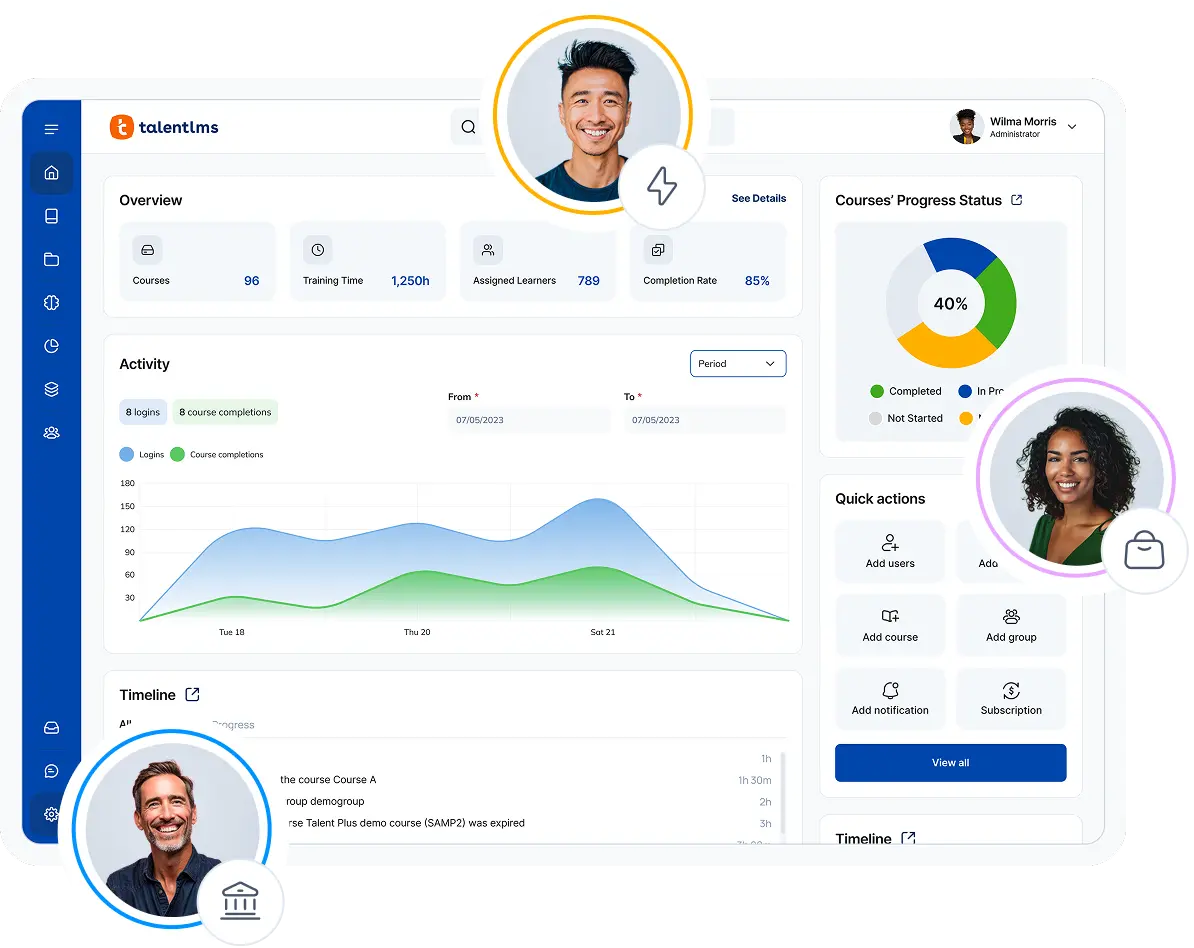
TalentLMS is ideal for teams that want to launch training quickly, without weeks of setup, IT specialists, or a dedicated L&D team. Whether you’re rolling out onboarding or compliance training, educating customers, or training partners, it gives your growing business everything you need in one platform.
According to G2, TalentLMS was awarded fastest implementation and easiest setup for 2026, making it a natural choice for small businesses that need results quickly.
Why we picked it
In most small businesses, training is often managed by someone in HR, Operations, or even the business founders themselves. And the biggest constraint? Time.
TalentLMS is built for just that.
Instead of overwhelming admins with endless configuration, it can help you get training live 2x faster than the industry average. You can create your first course with AI support using TalentCraft. Upload existing SCORM content, organize learners into Groups or Branches, and start assigning training within hours—not weeks.
As your business grows, the platform grows with you.
Need separate branded spaces for employees, customers, or partners? Branches let you manage multiple audiences from one account. Need compliance reporting? Reporting features help you monitor, visualize, and share learning insights when you need them, without manual follow-up.
Want to avoid creating every course yourself? TalentLibrary™ gives you a head start with access to ready-made workplace training covering compliance, soft skills, and professional development. In other words, you spend less time managing the LMS and more time helping people learn.
Pros
- Quick to set up without specialized IT knowledge
Supports employee, customer, and partner training
AI tools for creating courses, assessments, images, videos, and translations
Forever free plan, free trial for premium features, and transparent pricing
Learning paths, automated course assignments, and certifications
Cons
- Not designed specifically for schools, universities, or other academic institutions
- Some advanced AI, automation, and learning-path capabilities require higher plans
Key features:
- AI-powered course and assessment creation
- AI-generated images, videos, captions, and course translations
- Learning paths and automated course assignments
- Custom reports and configurable analytics dashboards
- Groups, branches, and delegated group supervision
- Certifications, gamification, surveys, tests, and assignments
- SCORM 1.2, xAPI, cmi5, and LTI 1.3 support
- Native integrations and API access
- Optional libraries of ready-made workplace training courses
Best for:
SMBs, employee, customer, partner training, onboarding, compliance
Pricing:
Free plan available; Premium free trial; Paid plans start from $119/month for 40 users.
What users are saying on G2:
The Good
“TalentLMS stands out as the best learning management platform because of its exceptional ease of use — both for administrators and learners. Setting up courses, managing users, and tracking progress is intuitive and requires minimal technical knowledge.
Its flexibility is a major strength: it supports a wide range of content formats (video, SCORM, quizzes, documents) and integrates seamlessly with tools we already use. The platform scales effortlessly, whether you’re training a small team or hundreds of employees.” – Michiel M., L&D Coordinator, Small Business, 5/5
How 1 L&D specialist scaled training for 1,000+ learners
Training that works for a handful of people doesn’t always work when your learner numbers grow into the thousands. That was the reality at Tagmarshal.
When L&D Specialist Mija Kruger took over, the company already had TalentLMS. But they were only scratching the surface. Courses were long, learner engagement was low, and customer training often meant expensive one-to-one sessions.
Instead of replacing the platform, Mija redesigned the learning experience. She broke long courses into bite-sized modules, role-specific learning paths, introduced automated reminders, and used TalentLMS’s AI tools to speed up course creation.
Within months, course completions increased by 600%, sign-ups grew 350%, and the Customer Success team saved more than 180 hours of one-to-one training. All while supporting 1,000+ learners.
For small businesses, it’s a reminder that you don’t need a large training team to deliver training efficiently. You just need the right LMS.

LMS for small businesses #2: iSpring LMS
iSpring LMS keeps things familiar by making existing systems simpler. That makes it a practical option for small businesses that want to train employees quickly without introducing an entirely new way of working.
Why we picked it
Do you already have presentations, training guides, videos, and internal workshops you want to turn into structured online training?
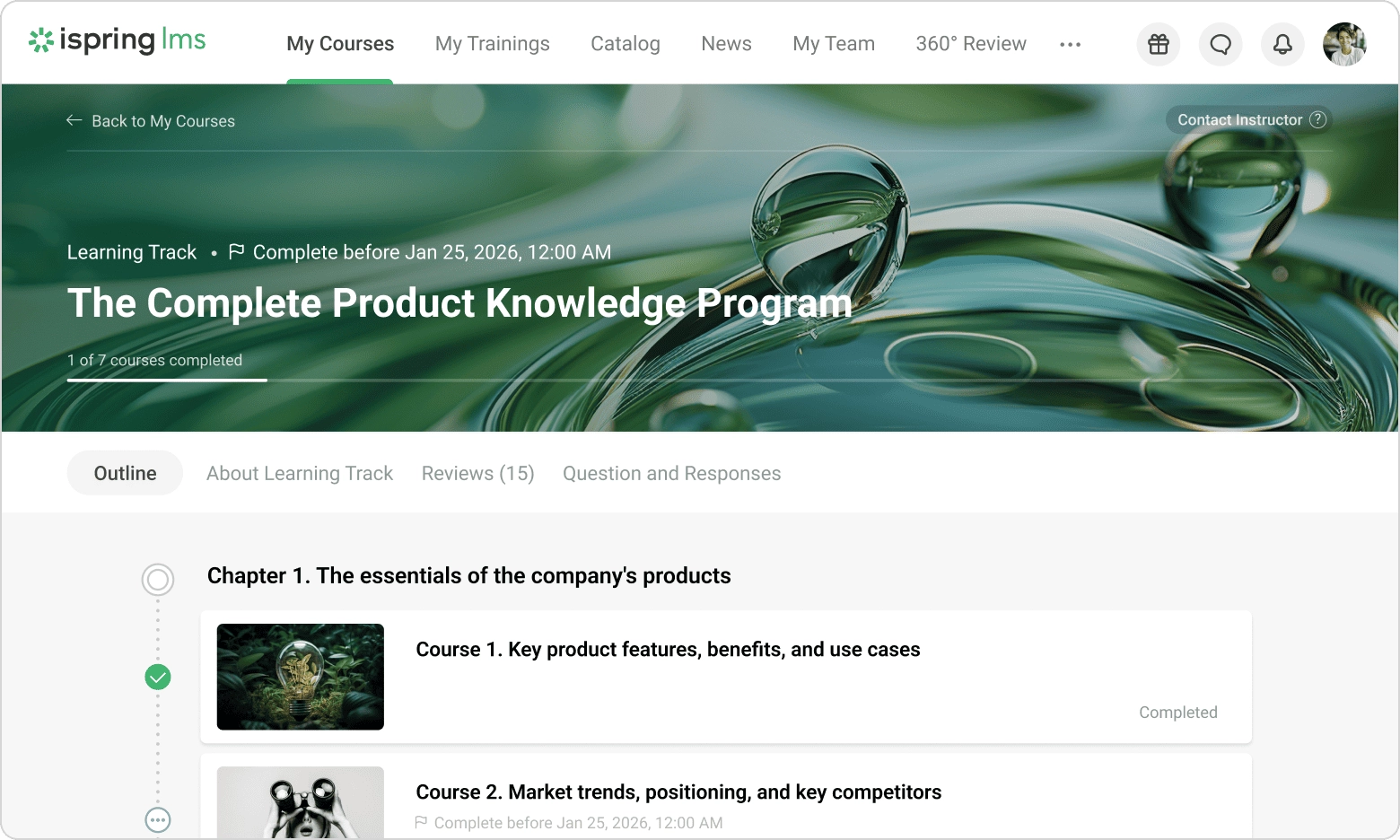
iSpring LMS offers a close integration with iSpring Suite, which lets teams transform existing PowerPoint presentations into online courses with quizzes, assessments, and reporting. Instead of rebuilding content, you build on training materials you already have, saving time.
As your training and company grow, the platform also supports certifications, mobile learning, assignments, and detailed learner tracking. For small businesses looking for a familiar, low-learning-curve LMS, iSpring LMS offers a comfortable balance between simplicity and functionality.
Pros
- Close integration with a PowerPoint-based authoring environment
Structured learning tracks and scheduled reports
Charges based on active rather than total registered users
Straightforward user interface
Cons
- Full content-authoring functionality is closely tied to the separate iSpring Suite product.
The vendor doesn’t display a straightforward total starting price on its current pricing page
Some users may not need its performance management and corporate-portal features
Less suitable for businesses primarily selling courses online
Key features:
- PowerPoint-based course authoring through iSpring Suite
- Interactive quizzes
- Learning tracks and automated assignments
- Scheduled reports and training analytics
- SCORM course delivery
- API for custom integrations
Best for: Small businesses that create PowerPoint-based training
Pricing:
iSpring says customers pay for active users. Plans start at approx. $8K per year, for 100 users.
What users are saying on G2
The Good
“iSpring LMS, Suite, and Cloud are an affordable option for small businesses looking to expand their educational opportunities. iSpring performs as expected with minimal downtime and minimal orientation to the program.” – Petra D., Director of Education, Small Business, 5/5
The Room for Improvement
“I’ve run into limitations with its reporting capabilities, as well as with the ability to group learning (from a learner’s perspective) outside of a learning track.” – Emma M., Design Manager, Mid-Market, 4.5/5
LMS for small businesses #3: Trainual
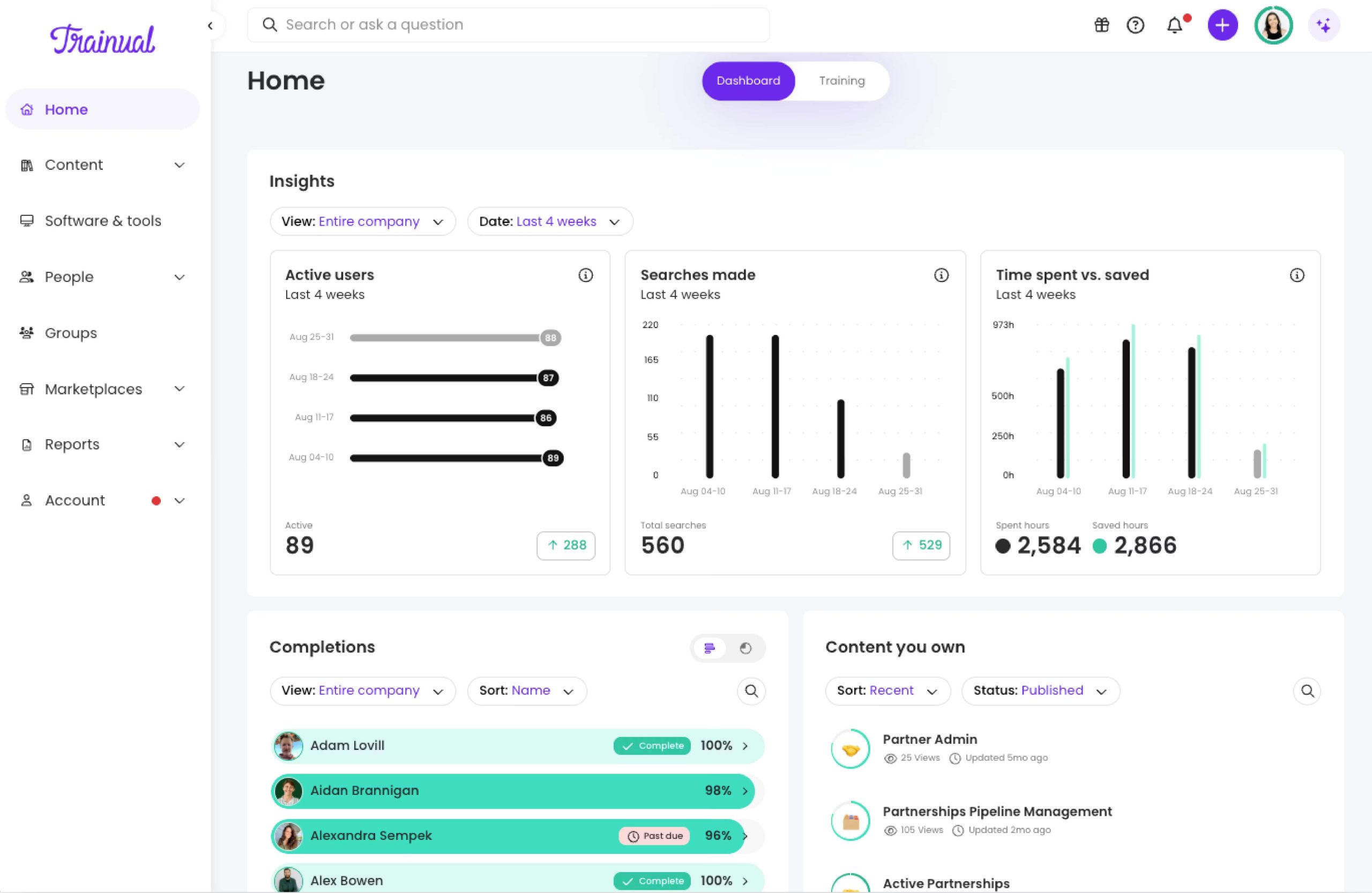
Trainual takes a slightly different approach to learning management. It combines onboarding, process documentation, and internal knowledge into one searchable training platform. For new and smaller teams building repeatable processes, it’s a practical choice.
Why we picked it
Growing businesses don’t just need somewhere to deliver training sessions. They also need somewhere to document how work gets done.
Trainual helps you do just that by turning hallway conversations into structured onboarding that anyone can follow. Your team can organize standard procedures, policies, videos, quizzes, and role-specific learning paths all in one place. Making it easier for new hires to get up to speed without constantly relying on managers for answers.
Its clean interface and template-based approach also make content creation quick and easy to update as the business evolves.
Pros
- Combines training with SOP and policy documentation
- Includes more than 500 customizable templates
- AI-assisted documentation and knowledge search
- Screen recording supports process demonstrations
Cons
- Pricing isn’t published, making costs difficult to compare without contacting sales
A mandatory implementation service adds to the initial cost
SCORM uploading is unavailable on the entry-level Core plan
Less suitable for businesses primarily looking for complex course administration
Key features:
- AI-assisted process and policy documentation
- More than 500 customizable templates
- SOPs, manuals, and employee handbooks
- Role-based onboarding and training paths
- Built-in screen recording
- AI-powered knowledge search
- Quizzes, progress tracking, and reporting
- HRIS and Slack integrations
Best for: Growing small businesses that want to combine employee onboarding with SOPs, policies, and internal knowledge management.
Pricing:
Trainual doesn’t currently publish subscription prices. Pricing varies according to team size and selected features, so businesses must request a quote. Trainual also states that implementation support is required and carries a one-time fee of $1,000.
What users are saying on G2
The Room for Improvement
“[…] It’s strong for SOPs and straightforward training, but it falls short on some advanced customization, deeper reporting, and more complex branching logic” – Damon G., Operations Manager, Small Business, 5/5
LMS for small businesses #4: Easy LMS
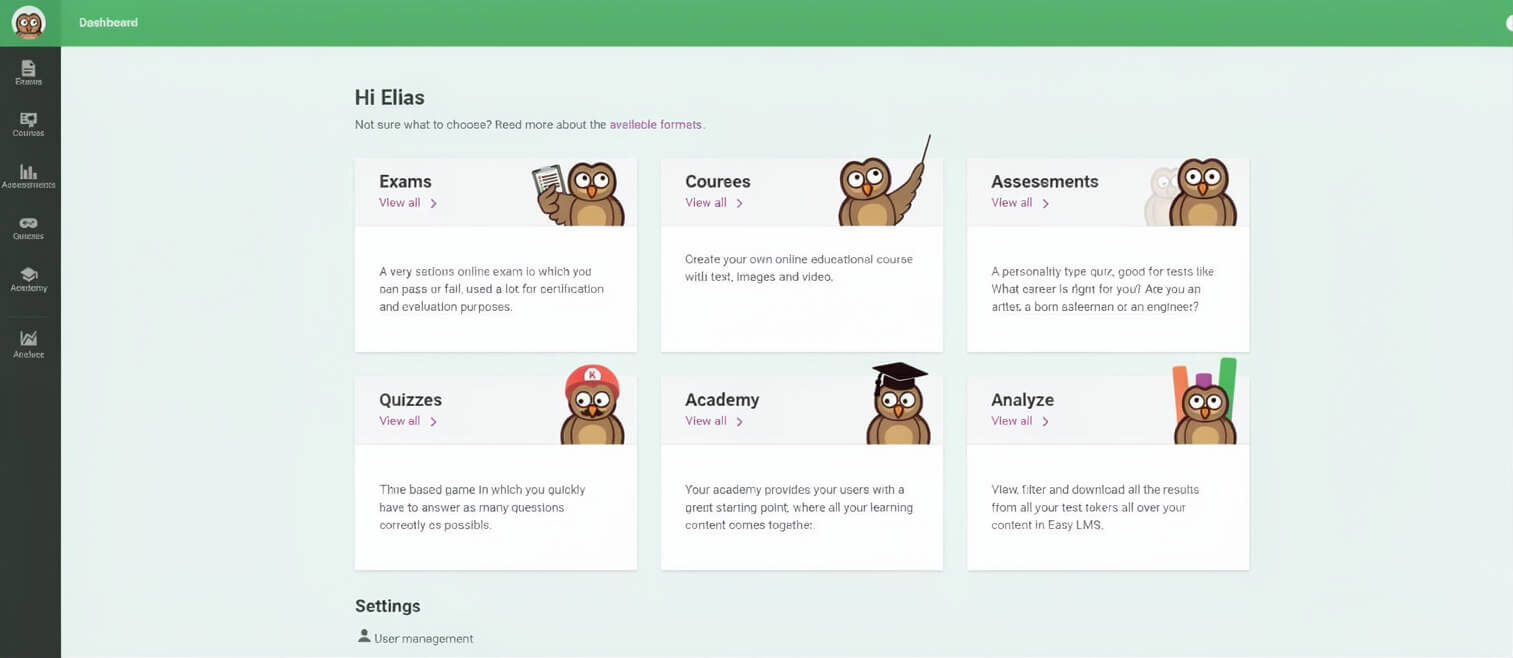
Easy LMS focuses on covering the essential LMS features without overwhelming you. It allows you to create courses, deliver assessments, and track learner progress through a straightforward interface that’s relatively quick to learn.
Why we picked it
For many small businesses, complexity isn’t the goal. Especially at first, they want to upload training, assign learners, issue certificates, and go back to running their company.
Easy LMS delivers that experience through a hosted platform with built-in course creation, exams, learning paths, and branded learner academies. Its flat-fee pricing model is also a little different from many other vendors. Easy LMS allows businesses to register unlimited participants while paying based on monthly training use rather than total users.
Pros
- Flat fee rather than per-registered-user pricing, and free trial available
Includes courses, exams, learning paths, groups, and certificates
Straightforward user interface
Cons
- Plans limit how many courses and exams learners start each month
Many standard LMS features, like reporting, API access, and SCORM uploads, require the advanced plan.
Fewer integration and automation options than broader business LMSs
Users report a steeper learning curve
Key features:
- Unlimited course and exam creation
- Learning paths
- Learner groups and group-based assignments
- Quizzes, practice questions, and assessments
- Certificates
- Individual and group progress reports
- SCORM uploads on the Advanced plan
- API and webhooks on the Advanced plan
Best for: Small businesses and training providers that want straightforward course and assessment delivery with flat-fee pricing.
Pricing:
The Basic plan costs $80 per month or $800 per year. It includes unlimited participants but limits usage to 3,000 course or exam starts per month. The Advanced plan costs $230 per month or $2,300 per year and raises the limit to 10,000 starts. A 14-day free trial is available.
What users are saying on G2
LMS for small businesses #5: Zoho Learn
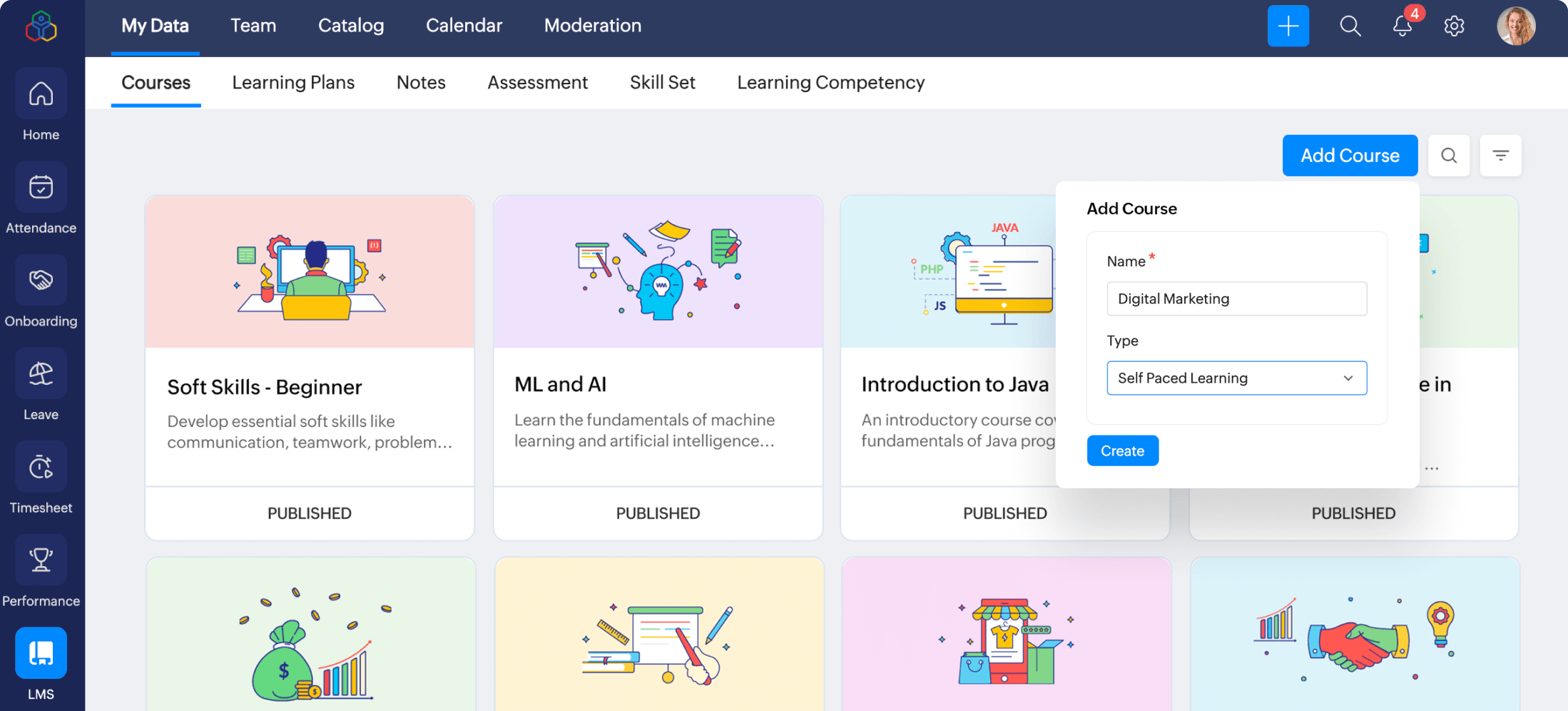
Zoho Learn combines employee training with knowledge management. It’s a practical choice for very small businesses that want to centralize both learning materials and company documentation without investing in a larger LMS.
Why we picked it
Small businesses often don’t separate training from everyday knowledge. Policies, onboarding guides, SOPs, and internal documentation all tend to live alongside learning content.
Zoho Learn brings those together through courses, manuals, quizzes, certificates, and knowledge bases that employees can return to whenever they need them. That makes it particularly useful for businesses looking to build an internal learning hub rather than simply deliver courses. Its free plan also lowers the barrier to getting started. Although businesses with more advanced learning requirements may eventually need the Professional edition.
Pros
- Free plan for up to five users
Combines LMS and knowledge-base functionality
Includes courses, manuals, quizzes, and certificates
Low reported starting cost
Cons
- The free version is limited to five courses
Course and learner management is less extensive than in a dedicated corporate LMS
External portal users may require paid add-ons
Fewer options for managing multiple internal and external training audiences
Key features:
- Course authoring tools with text, video, documents, and quizzes
- SCORM imports
- Knowledge manuals and articles
- Learning paths
- Certificates
- Question banks and assessment controls
- Instructor-led course management
- Course reminders and training content expiry
- External knowledge sharing and custom training portals
Best for: Very small teams that want affordable employee training and internal knowledge management, particularly existing Zoho customers.
Pricing:
Zoho offers a free plan for five users, five courses, five manuals, and two learning paths. Third-party software directories report that paid plans start at $1 per user per month, but Zoho’s current public page doesn’t consistently display the plan prices. Confirm the applicable rate directly with Zoho before purchasing. A 30-day Professional trial is available..
What users are saying on G2
The Room for Improvement
“Limited design customization and branding options. The analytics are fairly basic and lack more advanced insights into learner performance and skill assessments. It can be difficult to integrate third-party tools outside the Zoho suite.” – Verified User in Investment Management, Mid-Market, 4/5
LMS for small businesses #6: LearnWorlds
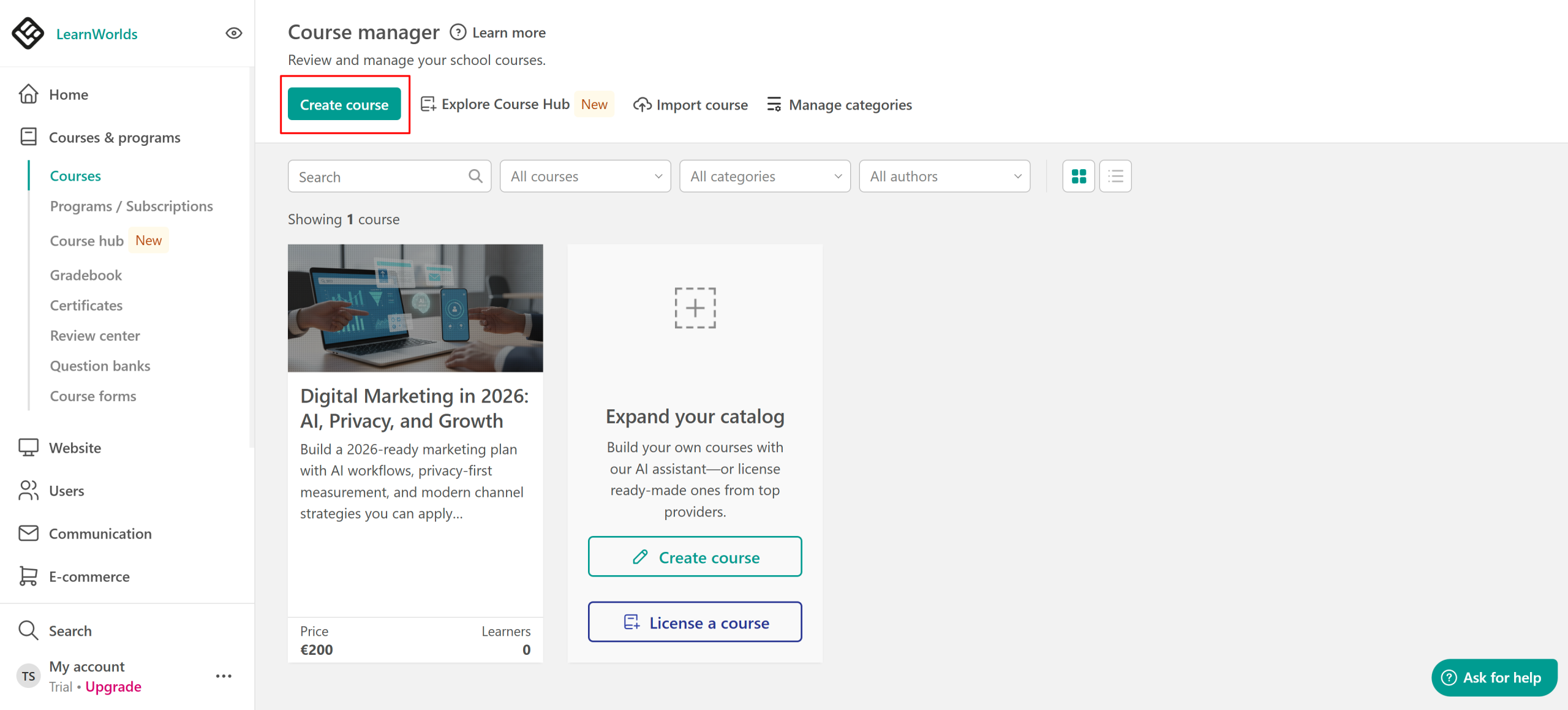
LearnWorlds is designed for businesses that see training as more than an internal initiative. If your courses are part of your business model, it gives you the tools to build, market, and sell them from one platform.
Why we picked it
With LearnWorlds you can sell courses, build memberships, and educate customers. It also includes website building, payment processing, subscriptions, affiliate management, and interactive learning experiences, making it easier to launch a training business without needing to manage different tools.
Despite its commercial focus, the platform is still approachable for smaller teams as well as independent coaches who are just getting started. Templates, AI-assisted content creation, and drag-and-drop editing make it relatively quick to launch professional-looking learning.
Pros
- Supports course sales, subscriptions, installments, and affiliate training programs
- Several assessment formats available
- Supports branded public learning experiences
- Website and landing-page builder
Cons
- Costs add up quickly because pricing is based on admin/seller seats.
The feature set may be unnecessarily commerce-oriented for internal employee training
The range of design, marketing, and course-selling options may require more setup time than a conventional business LMS
Managing multiple employee, customer, or partner audiences is less straightforward than in an LMS specifically for diverse audiences
Key features:
- Public learning website builder
- eCommerce checkout and payment gateways
- Paid courses, subscriptions, memberships, and installments
- Affiliate program management
- Interactive video
- AI-assisted course creation and translation
- Tests, quizzes, assignments, and self-assessments
- SCORM support from Pro Trainer
Best for: Course creators, coaches, consultants, and small businesses that plan to sell training online.
Pricing:
Starter costs $29 per month or $24 per month when billed annually, plus a $5 fee for each paid course enrollment. Pro Trainer costs $99 per month or $79 per month annually and removes the enrollment fee. Learning Center costs $299 per month or $249 per month annually. A 30-day free trial is available.
What users are saying on G2
The Good
“I like the tools available, just the layout, and how it helps me work out the courses. The AI support and interactive video capabilities are exciting.” – Paul C., Small Business, 4/5
The Room for Improvement
“I do wish there were more options for quiz questions. Also, I find the Ebooks a bit “basic” in appearance and wish I could create reusable templates for those” – Dana M., Training Executive, 5/5
LMS for small businesses #7: Moodle
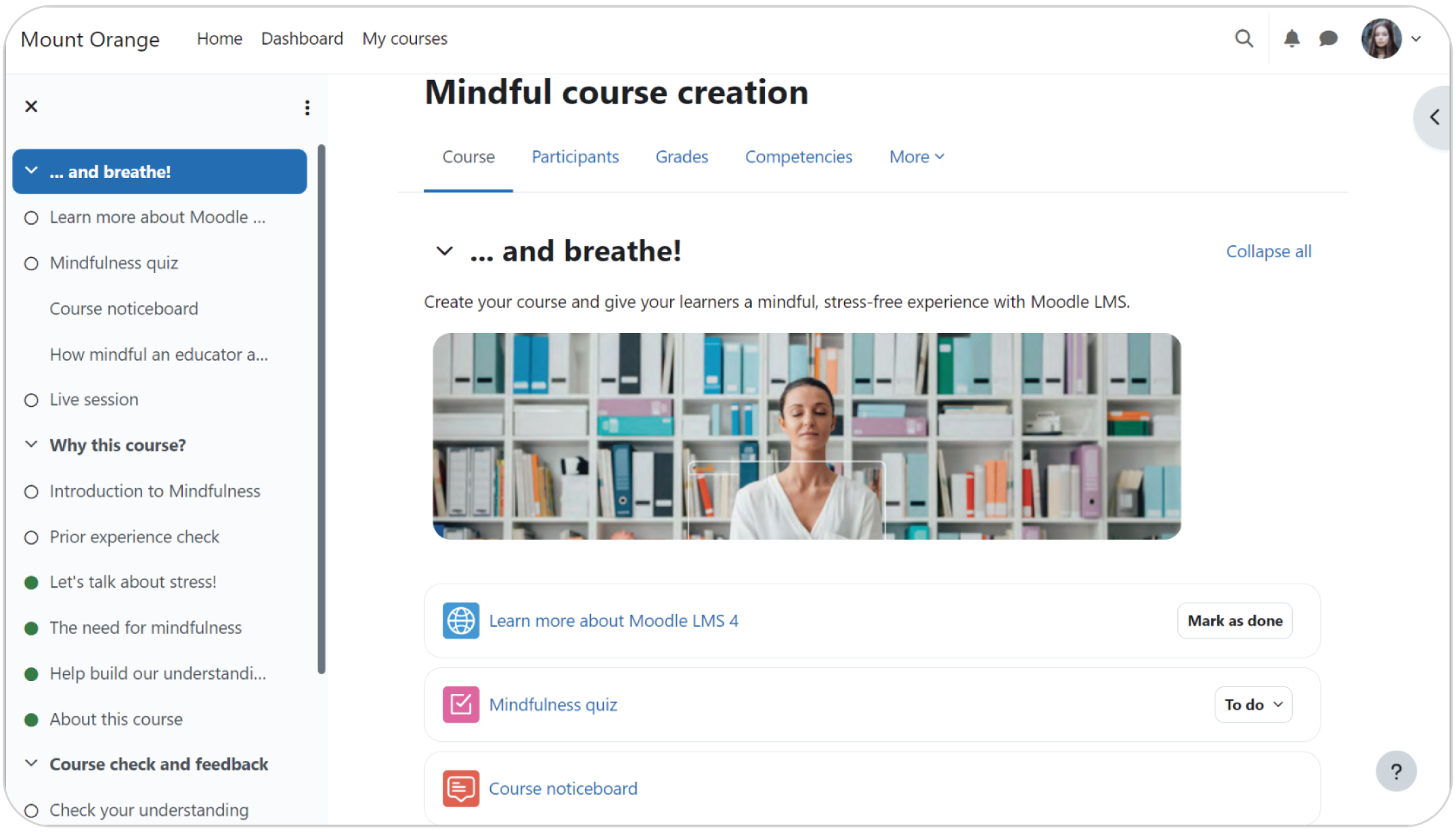
Moodle is an open-source LMS, highly configurable, and flexible. But it also asks more from the people running it than most cloud-based alternatives.
Why we picked it
Moodle’s open-source platform gives businesses complete control over their learning environment, from custom functionality to thousands of available plugins.
The trade-off? That flexibility comes with responsibility. Hosting, updates, security, and customization all sit with you or your IT team. For teams who have this in-house expertise, Moodle is often a worthwhile investment. For everyone else, a hosted LMS may offer a much faster and stress-free path to launching training.
Pros
- No software licensing fee for the open-source edition
Extensive plugin ecosystem
Course, assessment, and academic-learning functionality
International user and developer community
Cons
- Requires hosting, installation, maintenance, updates, and security management
Setup is more technically demanding than with a hosted SaaS LMS
Total cost depends on hosting, development, plugins, and support
The default experience may require configuration and design work
Key features:
- Open-source codebase
- Configurable courses and learning activities
- Assignments, quizzes, forums, and gradebook
- Competencies and learning plans
- SCORM course support
- Badges and completion tracking
- Multilingual interface
- Roles and granular permissions
- Extensive third-party plugin directory
Best for: Technically capable small organizations that need an open-source, highly configurable LMS or academic-style learning functionality.
Pricing:
Moodle LMS is free to download and use, with no licensing fees. However, businesses must provide their own hosting and technical expertise or pay a Moodle service provider. Hosting, implementation, maintenance, development, premium plugins, customization, and support make the total cost substantially higher than the software’s $0 license price.
What users are saying on G2
Which is the best LMS for a small business?
There is no “one size fits all.” Finding the best Learning Management System for small businesses depends on where your business is today and where you expect it to be a year from now.
- TalentLMS stands out as the best overall user-friendly LMS option for small businesses because it combines quick, IT-free setup with the functionality needed to support training as a business grows. Its intuitive interface, built-in AI capabilities, transparent pricing, and support for employee onboarding, compliance, customer, and partner training make it a flexible choice for small teams with varied needs.
- iSpring LMS and Trainual offer more specialized approaches to internal training. iSpring LMS is suited to businesses creating PowerPoint-based learning content, while Trainual combines onboarding with SOPs, policies, and process documentation.
- Easy LMS and Zoho Learn may appeal to smaller teams prioritizing straightforward course delivery and lower entry costs. Easy LMS uses flat-fee pricing with unlimited participants, while Zoho Learn combines training with internal knowledge management.
- LearnWorlds caters primarily to creators, consultants, and businesses that want to build, market, and sell online courses.
- Moodle caters to technically capable organizations that want an open-source, highly configurable platform and have the resources to manage hosting, maintenance, security, and customization.
FAQs
Which one is the best LMS for small businesses?
The best LMS for a small business depends on your team size, who you’re training (employees, customers, or partners), and how fast you need to launch. That said, TalentLMS is widely considered the best all-around Learning Management System for small businesses. While other options include LearnWorlds for selling courses and Trainual for internal onboarding.
How much does an LMS cost for a small business?
The cost of an LMS for a small business varies widely. Some platforms, like TalentLMS, are free to start. While paid plans for small teams can typically cost between $30 and $600 per month depending on your user count, essential features, and the plan you choose.
Is there a top free LMS platform for small businesses?
The top free LMS platform for small businesses depends on your team’s specific needs. TalentLMS has a forever-free plan that lets small teams build and run real training with no upfront cost. Moodle is a solid open-source option with great customization, but it does need more technical support.
Does a small business need an LMS?
A small business doesn’t strictly need a full Learning Management System (LMS). But one may become very useful once your team grows and you need regular employee onboarding and mandatory training. An LMS software centralizes it all, automates the admin, and gives everyone the same experience without adding to anyone’s plate


