

By Katie Azevedo, M.Ed.
A personal operating system is a set of habits, routines, processes, tools and self-maintenance strategies that we use to manage our lives.
Just like a computer needs an operating system (OS) to run programs and process information efficiently, students need a personal operating system to handle assignments, manage time, and stay mentally organized.
Anyone who’s productive and efficient likely has some kind of personal operating system in place, even if it needs improvement. (The tips below will show you how to do that.)
In this blog post, I’m sharing tips for how to create a personal operating system for students.
What is a Personal Operating System for Students?
I’ll restate this definition from the top of the post: A personal operating system is a set of habits, routines, processes, tools and self-maintenance strategies that you use to manage your life.
For students, it’s how you function on a daily basis to succeed academically and meet your goals. It’s the engine behind everything you do as a student.
What Are the Components of a Personal Operating System?
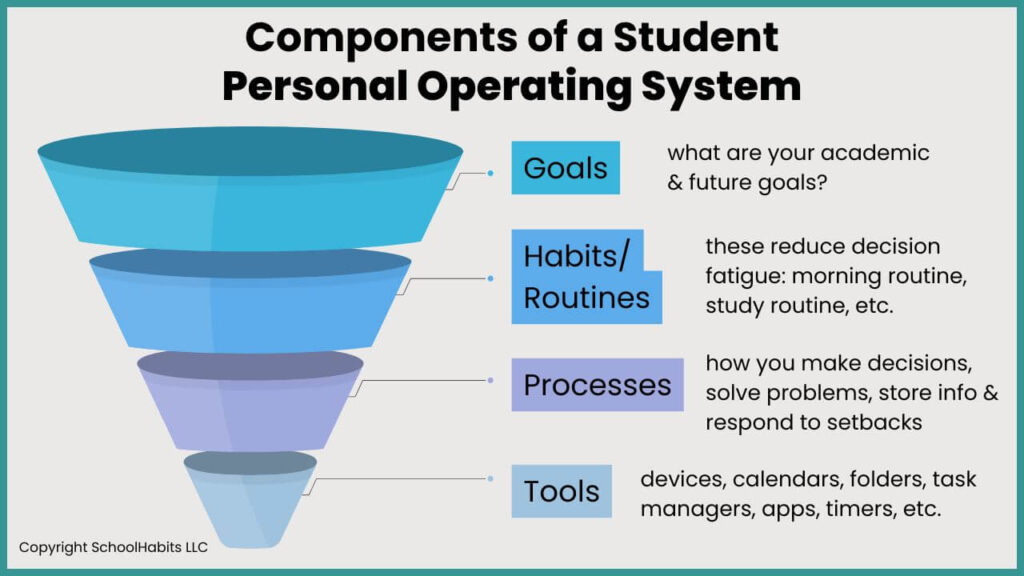
There are a few components of a personal operating system that will make your life as a student easier. I explain each of them below.
1. Goals
Your goals are the core of your entire personal operating system. They’re the “why” behind everything you do. Your goals determine your priorities, which allow you to focus on the right things as you move through high school, college, graduate school and beyond.
Your goals as a student will vary based on what you want to do with your education and career, as well as where you currently are in your schooling.
For example, if you’re in high school, your next big goal might be to get into college. If you’re in college, your next big goal might be to get a paid internship before you graduate, and then eventually graduate to a solid career.
Your goals steer your daily, weekly, and yearly actions. Without some kind of goal, you risk wasting time on the wrong things, working harder than you need to, and living a life of reactivity and stress.
I never suggest that high school or college students need to know what they want to do for the rest of their lives. But let’s look at a common goal for a high school student – get accepted to college – and break it down.
Example Main Goal: Get into College:
With this goal at the core of a student operating system, you could put in place yearly, monthly, and daily habits that increase your chances of meeting that goal.
→ Yearly Task: Working backward from your “get-into-college” goal, you would need to optimize your transcript and GPA.
→ Monthly Task: Working backward from there, you need to create a time management system that allows you to study and work without stress.
→ Daily Task: Working backward from that, you need to learn study methods that allow you to learn efficiently so you can get high grades in your classes.
So, essentially, your ultimate goal of getting into a good college comes down to what you’re doing every single day. We’ll talk more about routines and tools later in this post, as those are also part of your personal operating system, but it’s your routines and tools that enable you to move toward your larger goals a little bit each day.
2. Habits and Routines:
Good routines are a key component of a student’s personal operating system. Without good habits and routines, it’s hard to take the right daily actions that lead to your goals.
Routines and habits also reduce decision fatigue and free up mental space so you can just do the work. When you have good, simple routines in place, you don’t have to stress about when to do things, what you’re forgetting, or how to get started.
Below is a list of common student routines that, when done intentionally, can make your operating system run smoothly. I’ve covered many of these routines in previous blog posts, videos and podcast episodes, which I’ve linked. (Think of these like micro-programs that all run on your system.)
3. Processes
Another element of a personal operating system for students is processes. These include how you make decisions, solve problems, file documents, and respond to setbacks.
Processes also include your information-storing system (Google Drive, physical folders, notebooks, etc.).
Let’s look at some examples of the kinds of processes you could implement (or might already have) to make your student life easier:
Example 1: “When I get a new assignment, I…” → this is a process.
- …immediately add it to my student planner
- …always start it that day, no matter when it’s due
- …always open and read the assignment before I leave class so I know I won’t have questions later
Example 2: “When I have a test to study for, I…” → this is a process.
- …immediately put the date on my calendar
- …create a study schedule, mapping out spaced repetition study sessions
- …start making my study materials (flashcards, quizzes, etc.) within 24 hours
Example 3: “When I do poorly on a test, I …” → this is a process.
- …always do a post-mortem to figure out what went wrong
- …meet with the teacher/professor later that week to talk about the test
- …evaluate how I studied so I can adjust my study methods next time
Example 4: “When I take notes in class, I …” → this is a process.
- …always put a date and topic at the top of the paper/doc
- …use a note-taking method that works for me and the kind of material I’m taking notes on
- …try to fill in missing information and clean up my notes that same day (this takes like 10 minutes — and it’s so worth it)
Example 5: “When I feel overwhelmed with work, I…” → this is a process.
- …do a brain dump to clear my head
- …prioritize what I need to do and make a plan for doing it
- …go for a walk
4. Tools
A personal operating system for students must involve tools. These are your devices, calendars, task managers, folders, apps, timers, etc. Even a notebook is a tool.
The tools you use every day support the execution of your tasks. Your tools are not the system, but they make the system work better.
While tools are essential for productivity, more tools are not always better. I suggest keeping it simple and choosing tools that talk to each other (i.e., a task list that syncs with a calendar).
Benefits of a Personal Operating System for Students
There are many benefits of creating a personal operating system if you’re in high school, college or graduate school. The system you create as a student can scale to be a system that works for you in your career.
Creating a personal operating system as a student:
- Reduces stress and decision fatigue: You’re not figuring out everything from scratch every day.
- Boosts productivity and focus: Your brain isn’t overloaded with “what should I do next?”
- Improves resilience: Systems make it easier to bounce back from chaos. If something goes wrong, you just get back to the plan.
- Helps with executive dysfunction or ADHD: These students benefit especially from predictable structures and automation.
How to Start Creating Your Own Personal Operating System
Creating your own unique personal operating system doesn’t have to be a giant effort. You don’t need to suddenly change everything about the way you do things. Instead, start small and follow the steps below.
Step 1: Pick one area to improve.
Example 1: “I never know what to do after school” → focus on creating an after-school routine.
Example 2: “I always procrastinate and study at the last minute” → start by dialing in your time management system with a calendar.
Step 2: Audit your tools
Are your folders, planners, or digital apps helping you or hurting you? Be honest. Here’s a podcast episode where I teach you to evaluate whether your systems are actually working for you or not.
Step 3: Create one small process
Example 1: “Every Sunday night, I’ll look at the week ahead and plan my time.”
Example 2: “I spend 10 minutes a night reviewing any notes I took during class that day.”
Step 4: Revisit and refine monthly
A student’s personal operating system isn’t “set it and forget it.” Just like a computer needs occasional updates to run smoothly, your system needs regular check-ins to stay efficient. Evaluate what’s glitching or causing friction, and make small changes as needed. You’ll also want to update your system whenever your life circumstances change, like moving to the next grade level, starting a new semester, or taking on a heavier workload.
